Showing posts with label OS X. Show all posts

Sunday, October 19, 2014

OS X Yosemite: How to activate 'Dark Mode'


How to enable Dark Mode on OS X Yosemite:
  • Go to System Preferences
  • Go to General
  • Check Use Dark Menu Bar and Dock

Mac OS X Yosemite should now be running in Dark Mode. The Menu Bar and Dock background change to a darker color, and black Menu Bar text inverts to white. The Dock the pale translucent background becomes much darker.

You can also use the General Settings to change other parts of Mac OS X from Blue to Graphite. This removes much of the colour from the Mac OS X Interface and we think it sits well with Yosemite.


read more "OS X Yosemite: How to activate 'Dark Mode'"

Friday, October 17, 2014

How to find out if your Mac is compatible with Handoff OS X Yosemite


There are a lots of cool features in iOS 8 and OS X Yosemite. One of the most anticipated is Handoff, which enables you to pick up where you left off in an email, a document and other work between iOS and OS X devices. Handoff is relying on short-range Bluetooth 4.0 connectivity If your Mac is equipped with Bluetooth 4.0, LMP Version will say 0x6.


To determine your Mac's Bluetooth version
  • Go to Apple menu
  • Click About This Mac
  • Click on the System Report
  • Select Bluetooth
  • Find "LMP Version."
LMP Version should say 0x6. Anything lower than that is an older version of Bluetooth.

You can also access this information with a terminal command. 

Open up a terminal and type:


system_profiler SPBluetoothDataType | grep LMP


The Bluetooth 4.0 requirement would make the following Mac models Handoff-compatible: the mid-2011 MacBook Air, mid-2012 MacBook Pro, late-2012 iMac, mid-2011 Mac mini and late-2013 Mac Pro and above.

read more "How to find out if your Mac is compatible with Handoff OS X Yosemite "

Thursday, October 16, 2014

How to Setup Handoff / Continuity on OS X Yosemite (10.10)

Your Mac device had updated to OS X Yosemite. Also your iDevice runs iOS 8. All devices should support Bluetooth 4.0 (LE).


Setting up Handoff on OS X Yosemite:
  • Go to System Preferences
  • Be sure you login the same iCloud account.
  • Go to General
  • Enable - Allow Handoff Between this Mac and iCloud devices.
  • Turn on Bluetooth and Wifi

Setting up Handoff on iOS 8:

  • Go to Settings
  • Check iCloud account if the same as on Mac
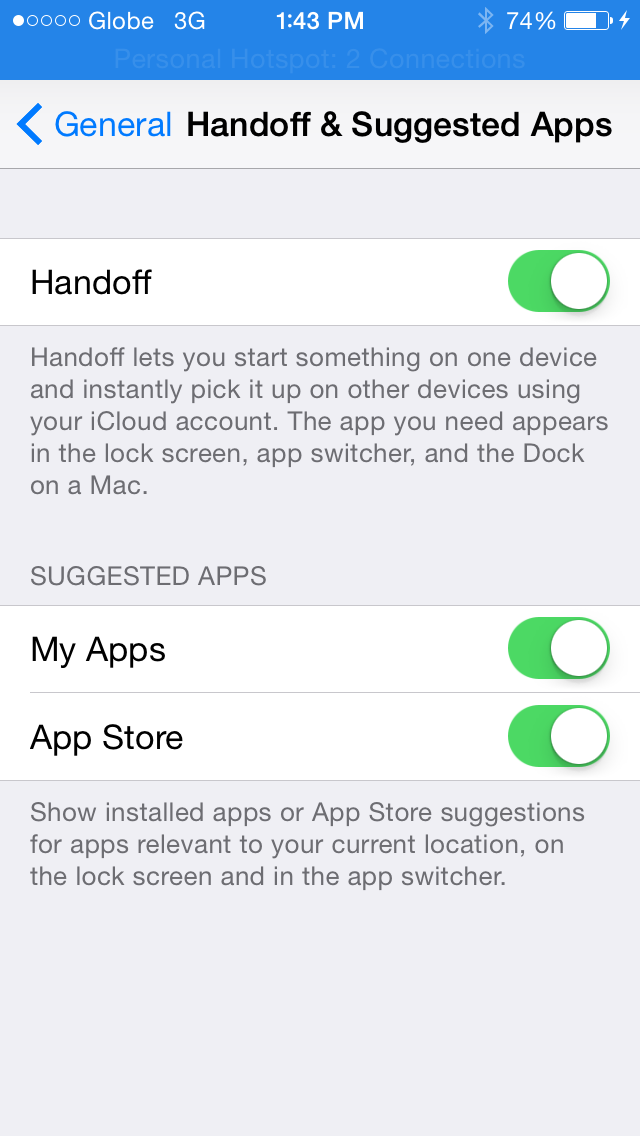
  • Go to General > Handoff & Suggested Apps
  • Enable - Handoff
  • Turn on Bluetooth and Wifi


Done. You've setup the devices for Handoff.


    read more "How to Setup Handoff / Continuity on OS X Yosemite (10.10)"

    OS X 10.10 Yosemite is now available to download

    Apple's next-generation OS X Yosemite Mac operating system is now available for download through the Mac App Store. It's a free update, It presents a whole host changes, most notably a revamped visual style that's a lot more colorful OS X. The enhanced look includes transparencies, minimized skeuomorphic assets and reduced shadowing.


    Apple also points out Continuity features that let users place and receive phone calls, send and receive SMS texts and create instant hotspots with a connected iPhone.

    Download OS X Yosemite for free through the Mac App Store. The update comes in at 5.16GB and is compatible with OS X 10.6.8 or later.
    read more "OS X 10.10 Yosemite is now available to download"